- Download and install an FTP client: Filezilla can be downloaded from here. After downloading the correct installer for your system, install it by running the installer and go through the installation proccess. Run it and connect.
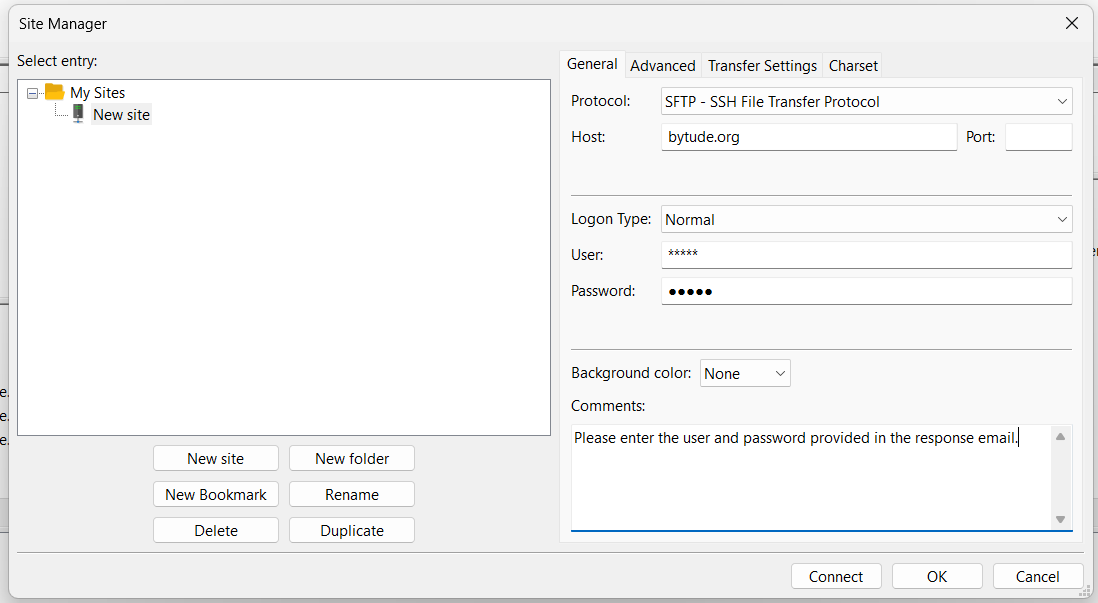
- To connect to the server: At the top, click "File" > "Site Manager..." (or Ctrl+S). Click "New site" then Enter the info and click "Connect":
- Protocol: SFTP
- Host: Bytude.org
- Logon Type: Normal
- User: [This is provided in Admin's response email.]
- Password: [This is provided in Admin's response email.]
- To download media: The long area that spans across the bottom of your screen is the transfer que; the box to you left is YOUR filesystem; and the box to the right is the connected filesystem. Double-clicking a file will start the transfer, while right-clicking an item will give you further options. When finished, please by shure to close your connection to the server.
- You are always welcome to ask stupid questions. admin@bytude.org
Here's a simple guide to connecting an FTP client: